If you look at any gaming giveaway video, it can look impressive at first. The colours match the game, and the reward card appears at the right moment. After watching it again, you start noticing issues. The gift card value changes between frames, or random text appears near the controller.
A visible Gemini mark is also present near one corner of the video. That mark is not the only concern. Distorted gaming objects, incorrect reward details, or fake-looking gift cards make a genuine giveaway appear unreliable.
Gaming reward promotions reach a wide audience. The Entertainment Software Association reported that 212.3 million people in the United States played video games for at least one hour each week in 2026. The average player was 37 years old, indicating that gaming content appeals to a broad age range.
The Gemini tool helps you create a short promotional video without recording a full gaming setup. Human review is essential before you publish the content. Every reward value, visual element, campaign date, and entry instruction must match the actual giveaway.
This guide explains how to plan, generate, clean, and publish a Gemini video for an Xbox, Roblox, PlayStation, Nintendo, Google Play, or any other gaming gift card campaign.
Start With a Real Gaming Reward
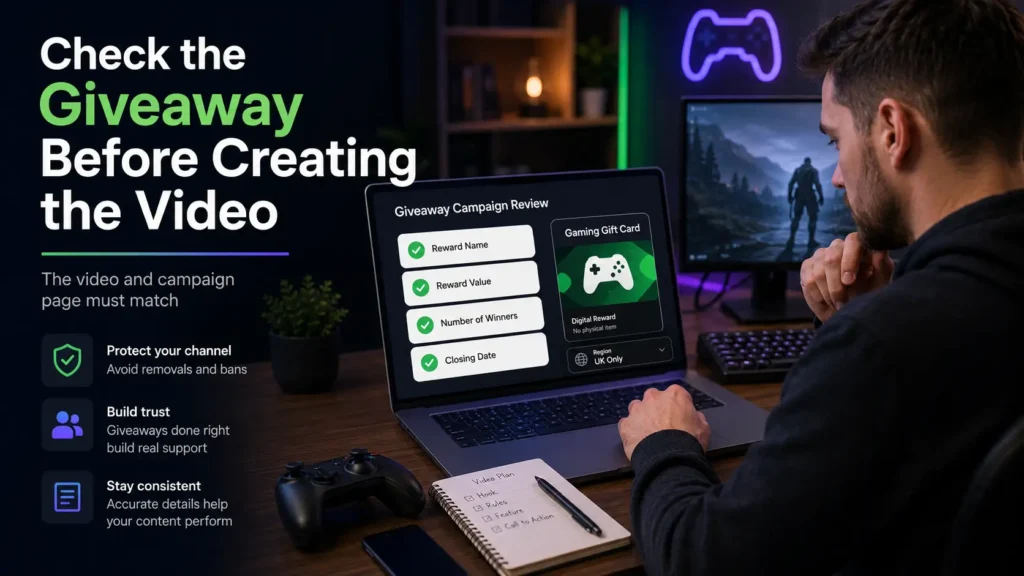
The video should be created only after the giveaway plan has been properly finalized, because even a good, visually appealing clip cannot correct or compensate for a campaign that does not have a confirmed reward or clearly defined entry rules.
First, decide what you are giving away, confirm the official reward name, and check whether it works in the country you want to target.
It is also important to consider that gaming gift cards sometimes have regional limits. A code purchased for one country may not work on an account registered in another region, so you should clearly mention the supported country on the campaign page.
Confirm these four details before preparing the Gemini prompt:
- The official gift card or gaming reward name
- The exact value that the winner will receive
- The number of available rewards
- The final date for valid entries
The amount shown in the video must match the amount written on the giveaway page. A video should never display a ₹1,000 reward if the real campaign offers ₹100.
You can apply the same rule to the number of winners. You should not show multiple gift cards if only one reward exists, unless the visual clearly serves as decoration.
How FreeGiftZone Reviews a Reward Campaign
At FreeGiftZone, every reward announcement must match the related page before publication. The reward name, value, entry conditions, and closing date stay consistent across the article and promotional media.
This simple check prevents confusion. A user should not see one amount on Instagram and another amount after opening the campaign page.
Choose a Concept That Fits the Gaming Gift Card
Each gaming platform has its own audience and visual style. The video concept should help viewers recognise the reward without copying official advertisements or using protected assets.
A Roblox gift card video works well with a colourful block-style environment. An Xbox campaign fits a modern gaming desk with green lighting, while a PlayStation giveaway suits a setup with blue tones.
You can also connect the scene with the device used for the reward. A Google Play gift code fits beside an Android gaming phone, while a Nintendo gift card works inside a family-friendly console setup.
Use one main reward in each video, because including multiple cards, brand names, values, and instructions can quickly make the clip confusing for viewers.
The main visual should answer two questions quickly:
- Which reward is available?
- Where can the viewer read the entry rules?
The video introduces the giveaway and directs viewers to the full campaign page.
Readers who want to explore reward options can review our guides for free Xbox gift cards, free Roblox gift cards, free PlayStation gift cards, and free Nintendo gift cards.
Decide Where the Video Will Be Published
Choose the publishing platform before generating the video. A wide YouTube video and a vertical Instagram Reel require different layouts.
For vertical clips, keep the reward card near the centre so that any text placed too low or too far to the right does not get hidden behind captions and controls.
A website video can use a wide frame if it appears near the giveaway explanation. Telegram supports different formats, but important text must remain readable on mobile screens.
Plan for one of these placements:
- A vertical YouTube Short or Instagram Reel
- A wide video on the giveaway page
- A short Telegram campaign announcement
- A social post linking to the full rules
The right scene format helps keep the main subject safe from cropping issues.
Write a Better Gemini Video Prompt
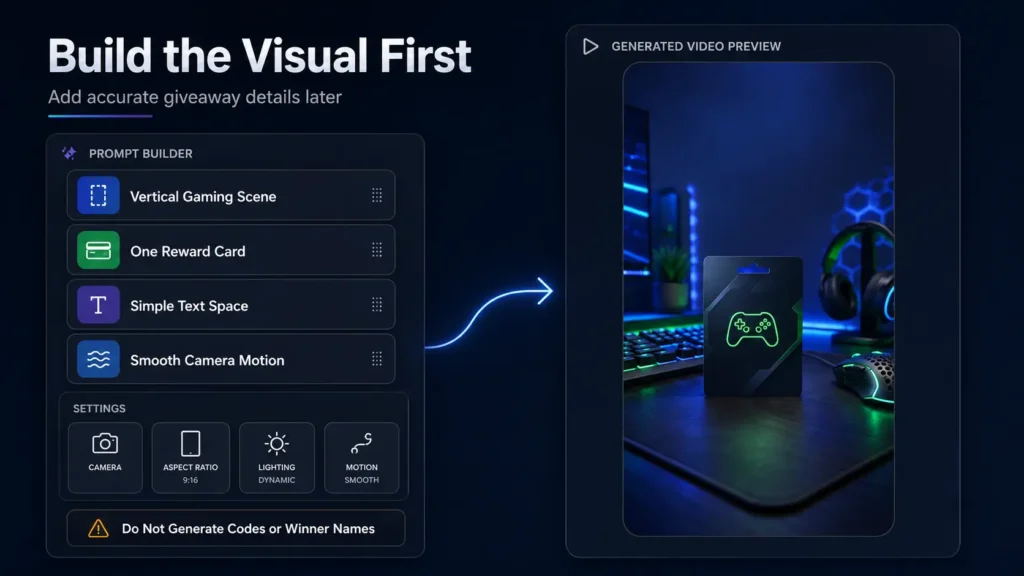
A strong prompt clearly explains the scene and camera movement. It also tells Gemini where to leave space for text that you will add later.
Do not generate important campaign text inside the AI video. Reward values, dates, and names distort between frames.
Use a prompt like this:
Create a vertical gaming giveaway announcement video. Show a realistic gaming desk with soft green and blue lighting. Place one generic gift card-style reward card in the centre. Keep the upper and lower sections simple so accurate promotional text can be added later. Use smooth camera movement. Do not generate brand logos, gift card codes, reward values, winner names, or readable promotional text.
This approach will allow Gemini to handle visuals while you control the factual details.
Keep the scene simple, as a reward card moving toward a gaming setup works well, while complex scenes with multiple characters tend to increase the chance of visual errors, and it is also a good idea to generate multiple versions so you can select the one that offers stable movement and clean space.
Inspect Every Frame Before Editing
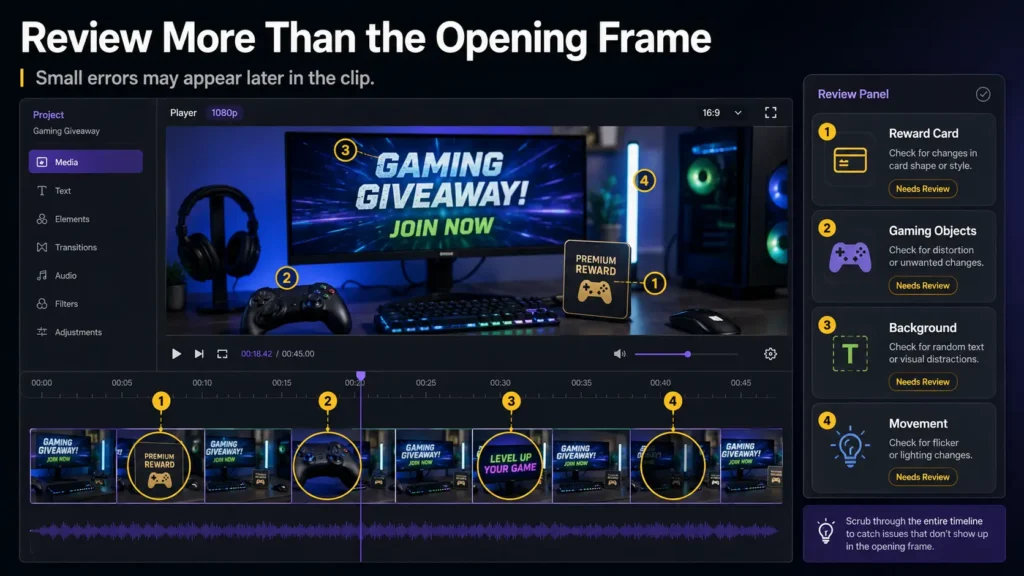
The first playback shows whether the concept works, while the second playback focuses on identifying errors, so pause the video at different points and carefully check the controller, gift card, gaming screen, hands, keyboard, and background, since AI-generated objects can shift or distort.
Review these areas:
| Review area | What you should inspect | Suitable action |
|---|---|---|
| Reward card | Random values, fake codes, or changing shape | Replace the card area or choose another clip |
| Gaming setup | Distorted controller, phone, or keyboard | Remove the object or regenerate the video |
| Background | Unwanted logos or unreadable text | Clean, cover, or crop the area |
| Movement | Flicker or changing visual details | Trim the section or select another result |
Instead of spending too much time trying to fix a weak clip, it’s usually better to move on and choose a stronger version that requires less effort to refine.
Remove Incorrect AI Text
Even when you clearly instruct Gemini not to generate text, it can still insert random or distorted words into the video, so it is important to remove those elements before adding your actual campaign details.
You can use an object removal or cleanup tool for this step, but make sure your selection stays tightly focused around the unwanted text so that the surrounding visuals are not affected.
After the cleanup is complete, play the repaired section at normal speed and watch carefully to ensure that it looks natural, without any flickering, blurring, or repeating patterns that might distract viewers.
Once the video is clean, you can add the final campaign text using a video editor. Keep the information simple and easy to read by including only the essential details:
- Reward name
- Reward value
- Closing date
- Entry direction
Remove the Visible Mark From Your Gemini Video
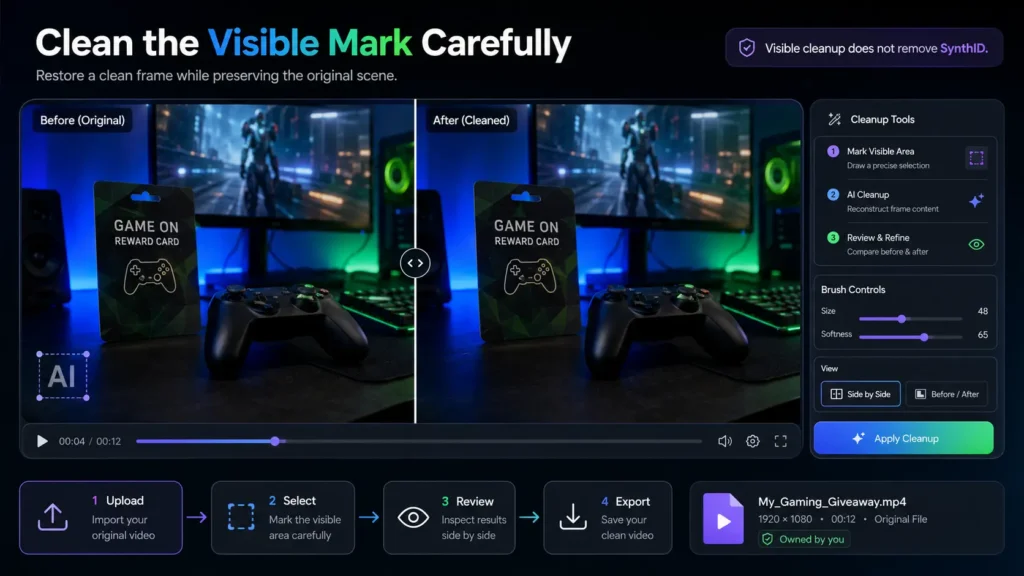
Videos generated with Gemini or Veo often include a visible mark, and in addition to that, Google applies SynthID, which is an invisible watermark used to identify AI-generated content.
If you are looking for a Gemini video watermark removal solution, you should only work on videos that you have created yourself or have proper permission to edit.
It is always best to start with the original file downloaded directly from Gemini, because videos that have been saved from social media platforms are usually compressed, which reduces their quality and makes the cleanup process less accurate.
When selecting the visible mark for removal, take your time to outline it carefully and keep the selection as precise as possible. Avoid covering a larger area than necessary, as this can affect nearby details and reduce the overall quality of the video.
The cleanup tool works by rebuilding the selected area using information from nearby frames, so simple and consistent backgrounds are usually easier to restore, while complex textures or moving objects may require multiple attempts to achieve a clean result.
After processing, watch the entire video from start to finish and pay close attention to the cleaned area, as issues like blur, flicker, or colour inconsistencies may only become noticeable during playback.
It is also important to understand that removing the visible mark does not remove SynthID, since it is embedded invisibly within the video and can still identify the content as AI-generated.
Only Edit Videos You Own
Before making any edits, you should always confirm that you have the right to use the video, because simply finding a video online does not give you permission to modify or reuse it.
You should only remove watermarks from videos you own or from content where you have clear and valid editing rights.
Acceptable sources include:
- Videos generated through your own Gemini account
- Gameplay footage that you recorded yourself
- Media created by your team
- Licensed content that explicitly allows editing
You should never remove branding or watermarks from another creator’s video, as this can violate ownership rights and harm your credibility.
It is also a good practice to keep the original file stored separately so that you always have access to the unedited version. When making changes, save each edited version with a different name so you can easily track revisions and avoid confusion.
In addition, maintaining records of the source tool, the prompt used, and the final exported file can help you stay organised and ensure transparency in your campaign workflow.
Add Verified Giveaway Text
Once your video is clean and ready, you can add the accurate campaign details in a clear and structured format.
For example:
Win a ₹500 Google Play Gift Code
Entries close on July 30
Read the rules on FreeGiftZone
You should never display actual gift card codes in the video, as this can lead to misuse or unauthorized redemption.
Make sure that the reward value shown in the video exactly matches the value mentioned on the campaign page, and double-check this detail before exporting the final version.
It is also important to avoid exaggerated or misleading phrases and instead use clear and honest wording so that viewers fully understand what the giveaway offers.
Add Complete Rules on the Giveaway Page
The purpose of the video is to guide viewers to the full set of rules, so you should never try to include important details in fast-moving or hard-to-read text within the video itself.
The campaign page should clearly explain:
- Who can enter
- What action is required
- How the winner is selected
- When and how the reward is delivered
You should also include any country-specific restrictions and clearly mention age requirements so that users can easily determine whether they are eligible.
Providing a visible support option is equally important, as it allows users to ask questions or seek clarification before participating in the giveaway.
Do Not Use AI Video as Reward Proof
Videos that are generated using AI are useful for introducing a giveaway, but they should never be used as proof that a reward has been delivered.
You should avoid creating fake redemption screens or artificial winner reactions, as these can mislead viewers and damage trust.
Instead, rely on real campaign records or genuine user submissions when showing proof, and always hide personal details and gift card codes before publishing.
The US Federal Trade Commission also warns that legitimate organisations do not ask for gift card payments.
A FreeGiftZone giveaway will never ask users to:
- Buy another gift card
- Share a gift card PIN
- Pay a processing fee
- Provide account passwords
Readers can learn more by reviewing our guide on how to identify and avoid gift card scams.
Collect a Reader Survey
You can run a survey to understand what factors build trust in giveaway videos.
You can ask a question like:
What makes you trust a gaming gift card giveaway video?
Provide options such as:
- Complete rules and a real closing date
- Verified reward proof
- A known website or creator
- No payment or gift card PIN request
When publishing the results, present them clearly, for example:
We asked 4,216 FreeGiftZone readers what they check before entering a gaming giveaway. 62% of selected complete rules, while 38% selected verified reward proof.
Prepare the Video for Social Platforms
Before publishing, review the final video on both desktop and mobile devices to ensure it looks correct in different formats.
For YouTube Shorts, keep important elements centred, as the platform may crop edges, and note that YouTube provides an AI-use label for generated content.
If the finished video also needs to be shared through a direct URL or embedded on a website, you can upload it using a video to link tool such as Media2URL. It gives the exported video its own link, which is useful when the original file is sitting only on your computer or phone.
Instagram Reels require safe spacing around the edges so that text is not hidden behind interface elements.
Telegram works best with shorter clips and clear captions that guide users to the full details.
Add an AI Disclosure
You should add a clear disclosure to build trust by informing viewers that the video was created using AI.
You can use labels such as:
- AI-generated promotional visual
- Video created with Gemini
- AI-assisted giveaway announcement
- Concept video for the reward campaign
Keep the label visible but subtle so that it does not distract from the main content.
Final Review Before Publishing
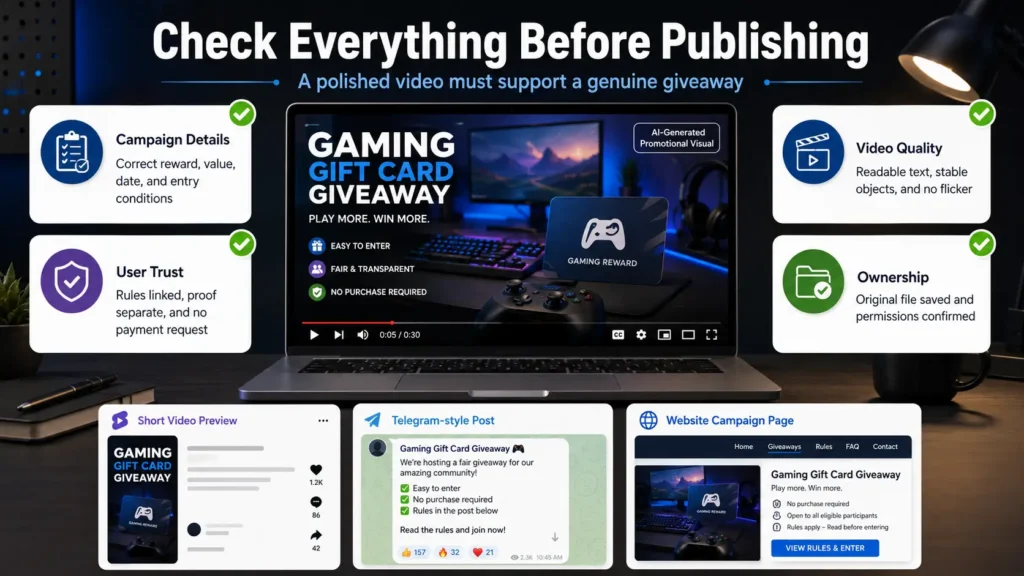
Before publishing, watch the entire video carefully on both desktop and mobile devices to ensure everything appears correct.
Check the following:
Campaign details
- Correct reward name
- Correct value
- Correct closing date
- Correct entry conditions
Video quality
- No unreadable text
- No distorted objects
- No flicker
- Proper dimensions
User trust
- Rules are linked
- AI disclosure is present
- Proof is separate
- No payment requests
Ownership
- You own the video
- Permissions are confirmed
- Original file is saved
- Assets are licensed
Finally, test all links to make sure they work correctly before publishing.
Final Thoughts
Gemini is a powerful tool to create good promotional videos for gaming giveaways, but it is important to review every detail carefully to maintain accuracy and trust.
Take the time to verify information, clean up visual errors, and ensure that you are only editing content you have the right to use.
While a polished video can attract attention, it is the clarity of your rules and the authenticity of your rewards that ultimately build long-term trust with your audience.
Frequently Asked Questions
Can Gemini Create a Gaming Gift Card Giveaway Video?
Yes, Gemini can generate the visual scene and motion for a giveaway video, but you should always add the real campaign details later using a video editor.
Can I Remove a Visible Mark From My Own Gemini Video?
Yes, you can remove the visible mark from videos you created or have permission to edit, but you should always review the final result to ensure quality.
Does Removing the Visible Gemini Mark Remove SynthID?
No, SynthID remains embedded as an invisible identifier even after the visible mark is removed.
Can I Use an AI Video as Giveaway Proof?
No, AI videos are meant for promotion and should not be used as proof of reward distribution.
Should I Disclose That the Giveaway Video Uses AI?
Yes, you should use platform tools or clear labels to inform viewers that the video includes AI-generated content.