Walmart gift cards can be useful when you already shop at Walmart and want a fixed balance that can be used towards eligible purchases. The confusing part starts when a website promises a free card without explaining what you actually need to do before a reward becomes available.
FreeGiftZone keeps current reward availability inside the user account rather than publishing a permanent Walmart code list on this article. If Walmart appears there, the reward screen should show the requirement attached to that option.
The article can remain online even when the reward catalogue changes, so its purpose is different. This page explains what a Walmart gift card can pay for, where it works, what restrictions apply, and how to protect the balance once you receive a card.
Check Your Current Reward Options

About Walmart Rewards on FreeGiftZone
If a Walmart related option appears inside FreeGiftZone, use the information shown with that reward as the current reference.
Walmart maintains its own rules for the purchase, distribution, and use of Walmart gift cards. FreeGiftZone is independent from Walmart and is not endorsed or sponsored by Walmart.
Because Walmart’s gift card terms can change, the existence of this article should not be treated as a promise that a Walmart reward is currently available through FreeGiftZone.
Walmart’s current Gift Card Terms and Conditions control the card’s use after it has been issued. The official terms should be checked again if Walmart changes its eligible purchase or account rules.
Walmart Gift Card vs Walmart Cash
Walmart Gift Cards and Walmart Cash are different systems. A gift card is a stored card balance, while Walmart Cash is promotional balance connected with eligible Walmart programs. Check which type of balance you have before assuming that the same payment or redemption rules apply.
| Feature | Walmart Gift Card | Walmart Cash |
|---|---|---|
| What it is | Stored gift card balance | Promotional balance earned through eligible Walmart programs |
| Where it comes from | Purchased or otherwise legitimately received as a Walmart gift card | Added through Walmart Cash offers and programs |
| How it is used | Applied to eligible Walmart or Sam’s Club purchases | Can be applied through Walmart account checkout and converted for the purchase |
| Can it buy another gift card? | No | No |
For the separate Walmart Cash rules, read Walmart’s Walmart Cash terms of use. Do not treat Walmart Cash as though it were a general-purpose gift card balance.
Where Walmart Gift Cards Can Be Used
Walmart gift cards are accepted through the Walmart and Sam’s Club channels covered by Walmart’s current terms, but they are not unrestricted cash. The eligible purchase list can change, and the exclusions matter when you are deciding what the balance can pay for.
| Situation | Current Walmart rule |
|---|---|
| Walmart stores in US or Puerto Rico | Accepted for eligible purchases |
| Sam’s Club locations | Accepted for eligible purchases |
| Walmart.com and Walmart app | Accepted where Walmart gift cards are supported |
| SamsClub.com | Accepted for eligible purchases |
| Buying another gift card | Not allowed |
| Precious metals | Not eligible |
| Financial products or services | Not eligible |
For the exact current list, check Walmart’s Gift Card Terms and Conditions before relying on a gift card for a particular product or service.
Where a Walmart Gift Card Should Come From
Walmart says gift cards can be purchased through Walmart stores, Sam’s Club, Walmart Business, its app, and authorised Walmart resellers.
That last word matters. Walmart’s current terms prohibit purchasing a gift card from an unauthorised third party, so an unusually cheap code from a private seller is not the same as buying through an approved channel.
Keep the purchase receipt until the card has been used successfully. If a card later has an activation or balance problem, knowing where it came from gives you a much clearer starting point.
What Happens When You Pay With a Walmart Gift Card
At Walmart checkout, the gift card behaves as a payment method for eligible purchases rather than as a separate reward that needs to be converted first.
If the balance covers the purchase, the eligible amount can be taken from the card. When another supported payment method is available and the card does not cover everything, the checkout flow can show how the remaining amount should be paid.
The card cannot be used to buy another gift card. Walmart’s payment guidance states this directly, so a Walmart card should not be treated as a way to turn the balance into an Apple, Google Play, Visa, or another prepaid card.
Walmart’s payment methods page confirms that gift cards cannot be used to purchase another gift card.
Why the Balance You See Can Sometimes Look Out of Date
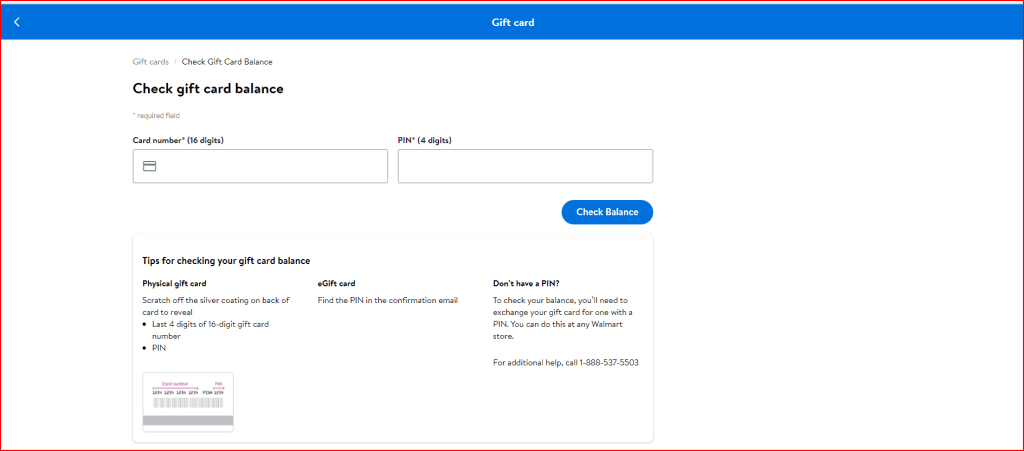
Walmart lets customers check gift card balances through its official online tools or by phone. If a card is supported inside an account, the account can also help show its balance and transaction history.
One detail is easy to miss: Walmart’s current terms describe the displayed balance as an estimate. Most purchases update it immediately, but Walmart says there can be occasions when the balance update is delayed.
If the number looks wrong immediately after a purchase, give the transaction time to settle before assuming that money has disappeared.
Walmart Gift Cards Do Not Expire, but Cash Redemption Is Limited
Walmart’s current terms say Walmart and Sam’s Club gift cards do not expire.
That does not mean the balance can normally be withdrawn as cash. Walmart lists specific jurisdictions where a low remaining gift card balance must be redeemable for cash because local law requires it.
For most users, the practical approach is to keep the remaining balance for another eligible purchase rather than treating the card like money that can be withdrawn from an ATM or transferred to a bank.
Can You Combine Several Walmart Gift Cards Into One?
Not by creating a new consolidated gift card.
Walmart’s current terms say it does not combine several gift cards into one new card. You also cannot use multiple gift cards to purchase another gift card as a way of merging the balances.
That matters when several small balances are left over. Keep track of the individual cards instead of expecting Walmart to transfer them into one replacement card.
What to Check Before You Redeem
- Confirm the card came from a legitimate source. Walmart’s terms prohibit gift cards purchased through unauthorised third parties.
- Check the balance through Walmart. An unrelated balance website does not need your card number and PIN.
- Know what you plan to buy. Gift cards, precious metals, and financial products are excluded.
- Keep the card number and PIN private. Walmart says lost or stolen cards are not replaced, and it does not take responsibility when someone gives the redemption details to another person.
When a Walmart Gift Card Request Should Make You Stop
A Walmart gift card is meant to pay for eligible purchases through Walmart and Sam’s Club. Someone asking you to read the card number and PIN over the phone is not following the normal checkout process.
Be especially careful when a person says a Walmart card is needed to pay taxes, settle a bill, unlock a prize, fix an account, or verify another payment. Once someone receives the usable card details, they may be able to spend the balance before you notice.
Walmart’s current terms also prohibit purchasing gift cards from unauthorised third parties. A heavily discounted Walmart card offered privately can therefore create a problem even before you try to use it.
If you are unsure whether a message really came from Walmart, open Walmart.com or the Walmart app yourself instead of following a payment or balance link inside the message.
Before You Spend a Walmart Gift Card
A Walmart gift card is easiest to manage when you know what the balance can and cannot pay for. It works across a broad part of the Walmart and Sam’s Club ecosystem, but gift cards, financial services, and precious metals remain outside the eligible purchase list.
The balance does not expire, and a small amount can stay on the card for a later purchase. If the balance shown immediately after shopping looks wrong, remember that Walmart says updates can occasionally be delayed.
For FreeGiftZone, check the live rewards area before completing activities specifically for Walmart. This article explains the card itself, while your account tells you what reward options are available now. If you are comparing retailer credit with other options, our Amazon gift card guide and Visa gift card guide explain those products separately.
Frequently Asked Questions
Do Walmart gift cards expire?
No. Walmart’s current Gift Card Terms and Conditions say Walmart and Sam’s Club gift cards do not expire.
Can I use a Walmart gift card to buy another gift card?
No. Walmart’s payment guidance and gift card terms exclude using a gift card to purchase another gift card.
Can I use a Walmart gift card at Sam’s Club?
Walmart’s current terms say eligible Walmart and Sam’s Club gift cards can be used at supported Walmart and Sam’s Club locations in the United States and Puerto Rico, as well as supported online services.
What happens if my Walmart gift card is lost or stolen?
Walmart’s current terms say lost or stolen gift cards are not replaced. Keep the card number and PIN private, and do not give redemption details to another person.